
ElevatEd School
Manager and Employee Dashboard
Tools: ReTool, JavaScript, SQL, Python
Role: Individual Designer & Programmer
Problem
Managers and editors lacked a centralized, scalable way to understand the health and performance of the Asynchronous Essay Editing Service.
Specific challenges included:
-
Managers needed a high-level view of operational health and staffing needs
-
Editors needed visibility into their personal progress and performance trends
-
The existing Airtable dashboard I previously designed was limited in layout flexibility, UI/UX, and analytical depth
-
Growing data volume created a need for cleaner visualizations and predictive insights
Solution
I redesigned and rebuilt the dashboard to support both managerial decision-making and editor transparency.
-
Reviewed the existing Airtable dashboard to identify strengths and limitations
-
Interviewed managers and editors to understand what data was most valuable and what was missing
-
Rebuilt the dashboard from scratch in ReTool, expanding it into a multi-page system
-
Used JavaScript, SQL, and Python to support advanced queries, transformations, and predictive models
-
Designed clearer, more readable charts and layouts for faster insight consumption
-
Conducted multiple rounds of user surveys and feedback sessions to refine usability and data relevance
Result
-
Launched an 8-page dashboard providing comprehensive visibility for both managers and editors
-
Enabled managers to make data-driven decisions, including:
-
Identifying high-performing or underperforming customer funnels
-
Forecasting staffing needs using predictive models
-
-
Gave editors access to personal performance metrics and company-wide statistics
-
Improved transparency and alignment between management and staff through shared data access
Presentation to Company Executives on the progress of the project along with the intended results and contribution to the company as a whole


Screenshots of the Company at a Glance and Revenue Breakdown pages of the dashboard with arbitrary values


Screenshots of the Predicted Supply and Demand and Editor Performance pages of the dashboard with arbitrary values
ElevatEd School
Season of Ink Database
Tools: Airtable, Airtable Automations, Pabbly Automations, Cognito Forms, Google Drive
Role: Full-Stack Systems Designer & Programmer
Problem
The Season of Ink writing competition lacked a centralized, scalable system for managing submissions, judging workflows, and internal data.
Key challenges included:
-
Competition submissions were handled outside of Airtable, while most company services already relied on Airtable
-
Manual data transfers created inefficiencies and increased the risk of errors
-
No automated system existed to fairly distribute entries to judges
-
The database structure had not been formally designed for long-term scalability or reporting
Solution
I designed and built a full-stack, cross-platform database and automation system to unify submissions and streamline judging workflows.
-
Designed the entire database architecture in Airtable, including:
-
Data storage structure
-
Field types, relationships, and formatting
-
Decisions on what information to collect and how it should be used
-
-
Integrated Cognito Forms to collect competition submissions
-
Used Pabbly Automations and Airtable Automations to sync data across platforms and eliminate manual transfers
-
Connected Google Drive for organized storage of submission files
-
Built automation logic to:
-
Automatically assign entries to judges
-
Distribute reviews based on each judge’s hourly availability for the week
-
-
Tested and iterated on workflows to ensure accuracy, fairness, and scalability
Result
-
Launched a centralized system supporting 100+ competition participants
-
Automated approximately 60% of data transfer processes
-
Eliminated 15+ hours of manual work per week
-
Created a scalable, transparent judging workflow with fair workload distribution
-
Unified competition data within the company’s existing Airtable ecosystem

Screenshot of the database in Airtable, also featuring automations that auto-assign submissions to judges based on hours available that week.

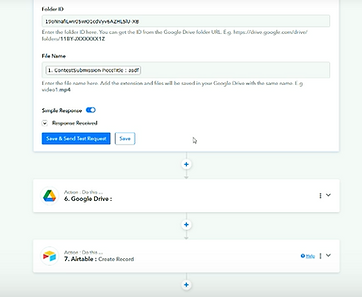
Screenshot of the Pabbly Automations, which process entries in Cognito Forms -> Upload submissions to Google Drive -> Send relevant information to the Airtable Database.
Tunefoolery Music
Automated Schedule-to-Payroll System
Tools: Google Sheets, Google Apps Script, Google Calendar
Role: Automation Engineer & Systems Designer
Problem
Payroll and scheduling for performing musicians relied on manual data entry, making the process time-consuming and error-prone.
Key challenges included:
-
Payroll hours were logged manually based on performance schedules
-
The process required frequent cross-referencing between schedules, calendars, and payroll sheets
-
Manual entry increased the likelihood of errors and inconsistencies
-
The system needed automation while still allowing manual edits when necessary
Solution
I built a flexible automation system using Google Sheets and Apps Script that synchronized scheduling, calendar events, and payroll calculations.
-
Designed a Google Spreadsheet to serve as the single source of truth for musician schedules
-
Wrote Google Apps Script to:
-
Read scheduled performance data
-
Automatically create and update events in Google Calendar
-
Calculate projected payments and update a Payroll Google Sheet
-
-
Structured the system to allow manual overrides and edits without breaking automation logic
-
Tested workflows to ensure data accuracy and error prevention
Result
-
Reduced payroll logging time by 75% (from ~4 hours to ~1 hour per month)
-
Eliminated common data entry errors through automated synchronization
-
Improved accuracy of projected payroll for upcoming performances
-
Created a scalable system that balances automation with human flexibility
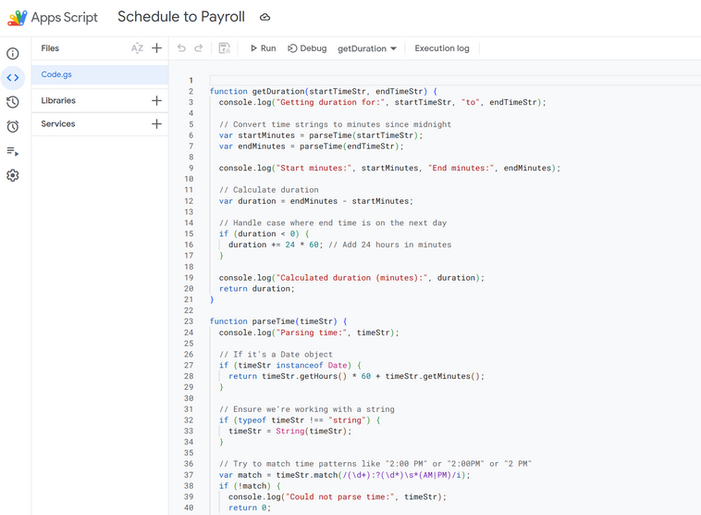
Snippet of code in Google Apps Script taking schedule entries and sending them to the payroll spreadsheet


Screenshots of the Schedule and Payroll spreadsheets used when testing the system. The schedule spreadsheet is formatted to be readable for the musicians within the company and, once the event is marked as done, will send the information to the Payroll spreadsheet to reduce manual input.